
10 Best Shopify Apps For Cart Drawer Upsell
When a shopper adds a product to the cart, your Shopify store gets one more chance to show a matching item, a free shipping goal, or a small add on. A Shopify cart drawer upsell app shows these offers in a side panel, so shoppers can see them without leaving the page.
A regular cart page takes people away from the product they were viewing. A cart drawer opens on the same page, so they can check their items, change the quantity, and keep shopping. It also gives you space to show useful offers while shoppers are already reviewing their order.
Choosing one is harder because many cart drawer upsell apps for Shopify look the same at first. The real differences are in the details, like how rewards work and how much control you get over each offer. Comparing these details across the best Shopify cart drawer apps makes the choice easier, and the list below is a good place to start:
Cart Drawer Upsell Apps for Shopify Compared at a Glance
| Shopify App | Best For | Rating | Starting Price |
|---|---|---|---|
| UpCartAOV: Cart Drawer Upsell | Cart and product page offers | 5.0 | 7 day free trial |
| Section Store & Cart Drawer | Cart, bundles, and page design in one place | 4.9 | Free to install |
| Kaching CartDrawer Cart Upsell | Controlling when each offer appears | 5.0 | $9.99/month (free for development stores) |
| Essent Cart Drawer Cart Upsell | Cart offers with a sticky add to cart bar | 5.0 | Free plan |
| Amp Slide Cart Drawer Upsell | Industry based cart designs | 5.0 | Free plan |
| Moon Bundles CartDrawer Upsell | Bundles and post purchase offers | 4.9 | Free plan |
| Qikify Slide Cart Drawer | Choosing what appears in the cart | 4.9 | Free plan |
| EA Sticky Cart Drawer & Upsell | Upsell and checkout rules | 4.9 | Free plan |
| XB: AI Cart Upsell Cart Drawer | AI-based cart setup | 5.0 | Free to install |
| Snap Cart Drawer Cart Upsell | Different carts for different audiences | 4.7 | Free |
List Of Cart Drawer Upsell Apps For Shopify
Every Shopify store needs something different from its cart, so the right Shopify app depends on your products, budget, and goals. Some cart drawer upsell apps for Shopify focus on rewards and product suggestions, while others also cover bundles, checkout rules, or AI setup. A smaller Shopify store may only need a clean cart and a free shipping bar. A growing brand may want more control through upsell rules, A/B tests, or separate carts for different markets. These differences become clearer when you look at what each Shopify app offers.
1. UpCartAOV: Cart Drawer Upsell
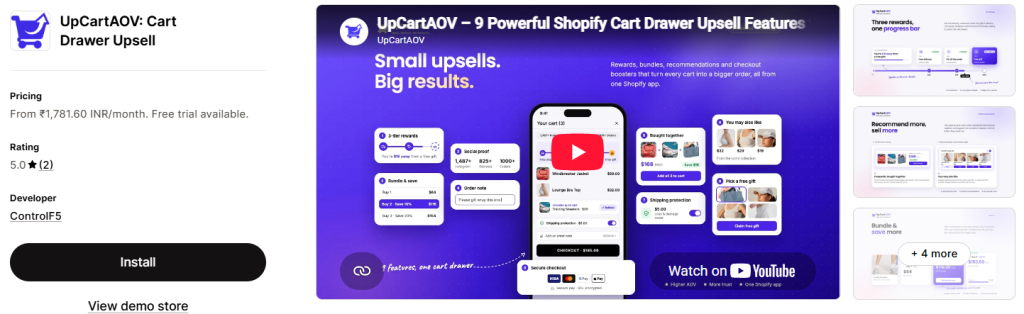
- Free Shipping & Discount Bar: Uses a live cart progress bar to show shoppers how much more they need to add to reach free shipping or a discount.
- Free Gift With Purchase (GWP): Adds a free product to the cart automatically at $0.00 once the shopper crosses your spend threshold, with no discount code needed.
- Cart Drawer You May Also Like: Displays related products in a swipeable Upsell Slide Carousel, giving shoppers a quick way to add one more item.
- Shipping Protection: Offers a one-click add-on that covers orders against damage, loss, or theft in transit and gives you another line of revenue.
- Order Note: Provides a text field where shoppers can leave gift messages or delivery instructions, so they do not need a separate contact form.
- Secure Checkout Badges: Shows payment icons like Visa, Mastercard, PayPal, and Apple Pay inside the drawer to build trust before checkout.
- Product Page You May Also Like: Shows recommendations on every product page through Shopify’s engine, same collection matching, or your manual picks.
- Frequently Bought Together: Presents a ready made bundle so shoppers can add complementary items in one click.
- Quantity Breaks: Sets volume pricing tiers that reward shoppers for buying more of the same product, which lifts units per order without a sitewide sale.
| Plan | Pricing |
|---|---|
| 100 orders/month | $19/month |
| 500 orders/month | $34/month |
| 1,000 orders/month | $49/month |
2. Section Store & Cart Drawer
Shopify Rating: 4.9 out of 5
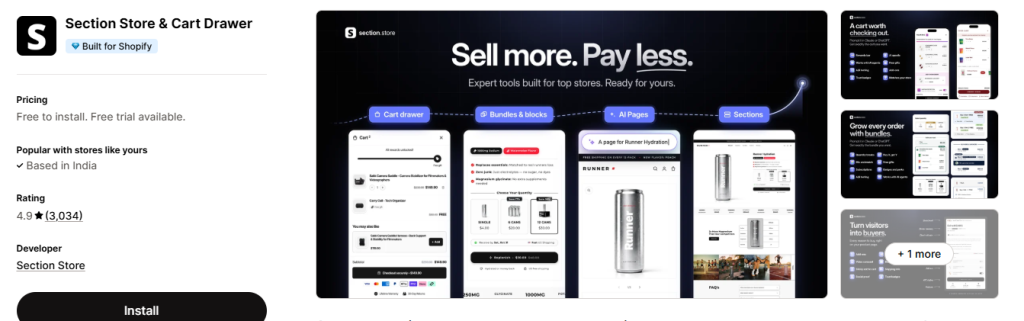
Section Store & Cart Drawer brings three jobs together in one Shopify app: cart drawer, bundles and page design. The cart slides out when a shopper adds a product or clicks the cart icon, and you build it block by block. Rewards, free gifts, product suggestions and trust badges can all sit inside it, giving shoppers a reason to add more before checkout. It replaces your theme’s own cart drawer and has separate adapters for themes like Horizon, Prestige and Turbo. If you would rather skip the settings, you can connect Claude or ChatGPT and ask for the cart you want.
Key Features:
- Reward Bar: Shows shoppers how close they are to free shipping, an order discount or a free gift, based on cart total or item count.
- Free Gifts: Adds the gift to the cart off when the shopper reaches the tier and removes it if the cart drops below that tier.
- Product Upsells: Lets you set rules for which products appear based on what is in the cart, or use Shopify’s related and complementary recommendations.
- A/B Tests: Compares up to four cart versions and picks the winner on revenue per visitor.
- Beyond the Cart: Lets you create bundles, build pages with AI, add conversion blocks to the buy box, and use Claude or ChatGPT to set everything up without leaving one Shopify app.
Pricing:
| Plan | Pricing |
|---|---|
| Section Store | Free to install; premium sections available for a one-time charge |
| Section Store Plus | ₹1,426.91 INR/month |
3. Kaching CartDrawer Cart Upsell
Shopify Rating: 5.0 out of 5
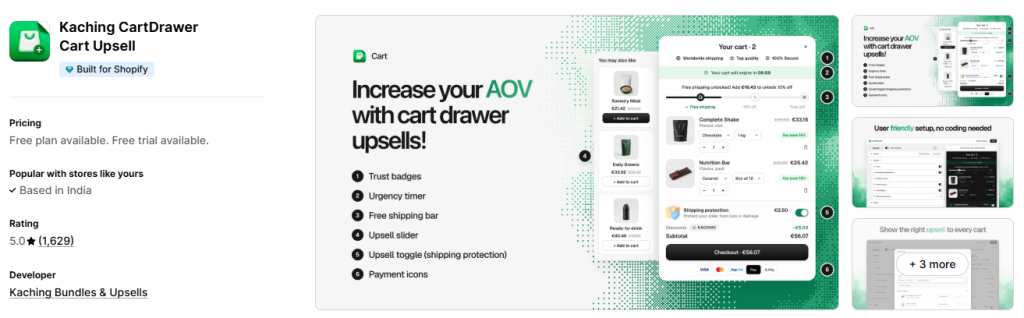
Kaching Cart Drawer Cart Upsell replaces your theme’s default cart with a slide cart that opens when a shopper adds a product. The drawer keeps rewards, product offers, and checkout together, so shoppers can see what else they can add or unlock before paying. You switch it on through an app embed, and you can switch it off anytime to return to your theme’s cart. You do not need coding for the setup, and you can style the drawer to match your brand and translate it into any language. This Shopify app also works with other Kaching apps and popular page builders like GemPages and PageFly, so it can fit into the setup you already use.
Key Features:
- Upsell Slider: Shows frequently bought together products in a slider inside the cart drawer, and shoppers can add them in one tap.
- Upsell Display Rules: Lets you decide which offers appear based on cart value, cart quantity, products, or collections.
- Reward Progress Bars: Shows shoppers how much more they need to spend to unlock free shipping, a discount, or a free gift.
- One Click Add Ons: Gives shoppers a simple toggle to add shipping protection or gift wrap right before checkout.
- A/B Testing: Compares different upsells and rewards so you can keep the version that earns more.
Pricing:
| Plan | Pricing |
|---|---|
| Development stores | Free |
| 99 orders/month | $9.99/month |
| 199 orders/month | $14.99/month |
| 499 orders/month | $24.99/month |
4. Essent Cart Drawer Cart Upsell
Shopify Rating: 5.0 out of 5
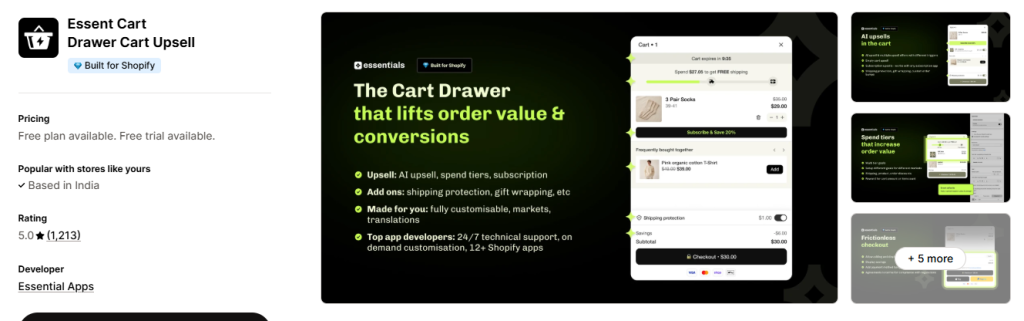
Essential Cart Drawer puts several sales tools into one Shopify app, starting with upsells that appear inside the cart. A reward bar shows shoppers how close they are to free shipping, which gives them a clear reason to add one more item. Limited time deals get extra attention through a countdown timer and announcement bar. On product pages, a sticky add to cart bar keeps the button on screen as people scroll. You also get full control over the cart, including a discount code box, order notes, and translations for shoppers in other countries. If you need help with any of this, the support team is available 24/7.
Key Features:
- AI or Manual Upsells: Recommends products inside the cart drawer through Shopify AI, or you can choose the products yourself.
- Spend Tier Rewards: Unlocks free shipping, free gifts, or automatic discounts when the cart total reaches the amounts you set.
- Cart Countdown Timer: Adds a timer and announcement bar to the cart to draw attention to limited time deals.
- Discount Codes and Order Notes: Allows shoppers to enter a code or leave a note for your team from the cart.
- Sticky Add to Cart Bar: Keeps the button in view as shoppers scroll a product page, along with the product image, variant picker, and quantity.
Pricing:
| Plan | Order Limit | Pricing |
|---|---|---|
| Free | 30 orders/month | Free |
| Essential 1 | 99 orders/month | $8.99/month |
| Essential 2 | Up to 199 orders/month | $13.99/month |
| Essential 3 | Not specified | $23.99/month |
5. Amp Slide Cart Drawer Upsell
Shopify Rating: 5.0 out of 5
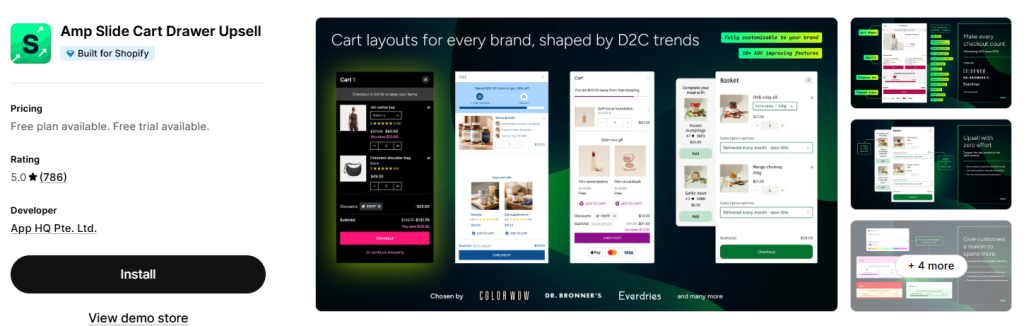
Amp Slide Cart Drawer Upsell has been serving Shopify merchants since 2019 and has handled carts through multiple Black Friday Cyber Monday seasons. Design is a big focus here, with cart templates made for industries like beauty, apparel, and supplements. Your cart can also carry useful messages, such as coupon codes, sale details, and shipping deadlines, right when shoppers are deciding to buy. Selling across languages and markets is covered too. For merchants who like managing tasks through Shopify’s AI assistant, it also works with Sidekick.
Key Features:
- Tiered Rewards Bar: Fills up as items go into the cart and tells shoppers how far they are from the next reward.
- In Cart Recommendations: Suggests frequently bought together items through AI or the products you pick by hand.
- Free Gift Offers: Triggers a gift based on specific products, order quantity, or cart value, and supports buy X get Y deals.
- Persistent Cart Icon: Follows shoppers around your Shopify store as a floating button, so they can open the cart from any page.
- Daily SKU Insights: Gives you daily data at the SKU level to help you track the lift in average order value.
Pricing:
| Plan | Pricing |
|---|---|
| Free Forever | Free |
| Growth | $29.99/month |
| Pro | $49.99/month |
6. Moon Bundles CartDrawer Upsell
Shopify Rating: 5.0 out of 5
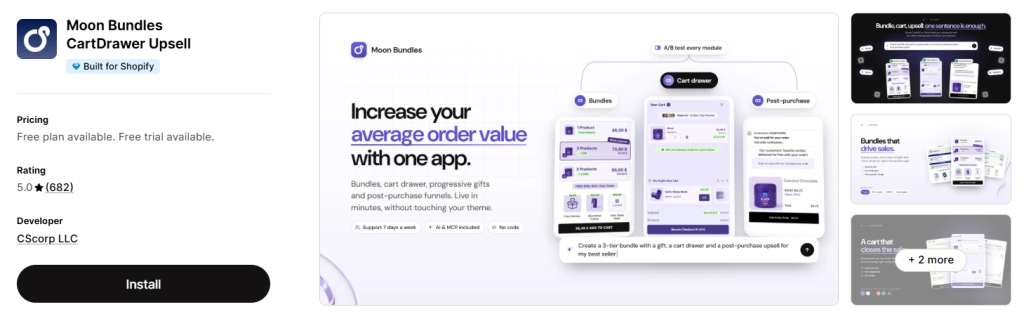
Moon Bundles CartDrawer Upsell suits merchants who want to manage cart offers and bundles together instead of running a separate Shopify app for each job. Its cart drawer is one of four modules, along with bundles, progressive gifts, and post purchase funnels. All four sit in one dashboard, so you can handle the product page, cart, and after checkout offers from the same place. An MCP connector also links it to AI tools like Claude, ChatGPT, Gemini, and Perplexity, which can review your catalog and prepare offers for you. Nothing goes live on your Shopify store until you approve it.
Key Features:
- Slide Out Cart Drawer: Brings free shipping progress, social proof, and code entry into a cart panel that you can theme to suit your brand.
- Cart Cross Sells: Recommends extra products inside the drawer, so shoppers can add more without returning to a product page.
- Progressive Gifts: Sets spending tiers in a live progress bar that unlock free shipping, an order discount, or up to two free gifts.
- Flexible Bundles: Creates fixed, tiered, or mix and match offers with volume breaks and BOGO deals, and applies the discounts automatically.
- One Click Post Purchase Upsell: Presents a new offer right after checkout, and shoppers can accept it without entering their card details again.
Pricing:
| Plan | Order Limit | Pricing |
|---|---|---|
| Discovery | Free | — |
| Essential | $19.99/month | $191.88/year |
| Pro | $39.99/month | $407.88/year |
| Premium | $79.99/month | $803.88/year |
7. Qikify Slide Cart Drawer
Shopify Rating: 4.9 out of 5
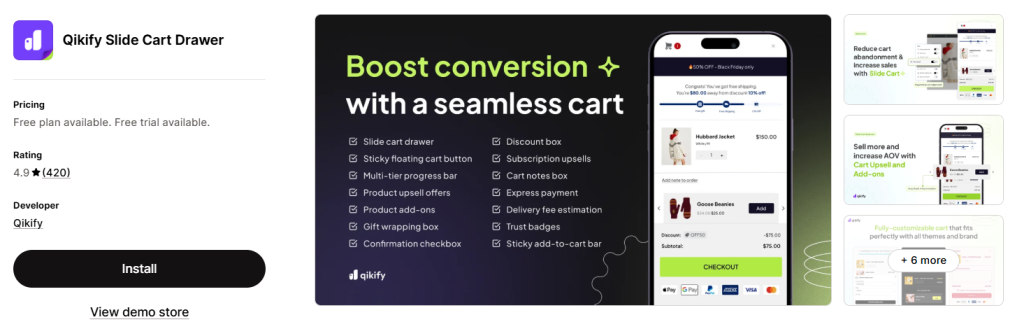
Qikify Slide Cart Drawer connects two key parts of the buying journey: the product page and the cart. A sticky bar lets shoppers choose a variant and quantity as they browse, while the slide cart lets them review their order without changing pages. You decide what goes inside the drawer, so one Shopify store might show a reward bar and gift wrapping, while another keeps only an upsell and an order note. The sticky bar gives you similar control because you can hide it on selected products by tag, type, or vendor. If you already use Qikify Upsell & Cross-sell, those campaigns can appear directly in the drawer. This makes it easier to run your cart and upsell offers together.
Key Features:
- AI Cart Upsell: Uses AI to suggest related products inside the drawer while shoppers review their order.
- Reward Bar: Links a free shipping or free gift goal to a cart total of your choice.
- Edit Variants in Cart: Lets shoppers switch a product variant from the cart instead of going back to the product page.
- Cart Add Ons: Gives you options like gift wrapping, an order note, and trust badges to display in the drawer.
- Sticky Add to Cart Bar: Adds variant and quantity pickers on product pages, and you can hide the bar by product tag, type, or vendor.
Pricing:
| Plan | Monthly Pricing | Annual Pricing |
|---|---|---|
| Free | Free | — |
| Premium | $14.99/month | $143.90/year |
| Shopify Plus | $99/month | $950.40/year |
8. EA Sticky Cart Drawer & Upsell
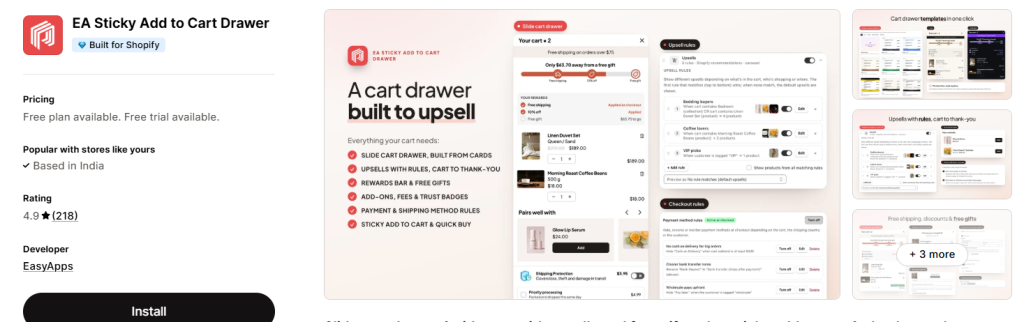
Shopify Rating: 4.8 out of 5
EA Sticky Add to Cart Drawer uses a card based editor, where items, totals, notes, discount codes, and express checkout buttons each sit as separate sections. As you arrange them, a live preview shows how the drawer will look. Its upsell rules also work on product pages and the thank you page, so offers are not limited to the cart. At checkout, you can hide, rename, or reorder payment and shipping methods. Collection pages get their own tool too, with quick buy buttons that add a product without opening its page. Since the app runs as an app embed, your theme code stays untouched, and you can turn it off from the theme editor.
Key Features:
- Rule Based Upsells: Decides which add on appears in the drawer according to the rules you set.
- Tiered Rewards Bar: Creates free shipping, discount, and free gift levels, with a gift picker and rewards list in the drawer.
- Add-Ons and Fees: Includes options like shipping protection, and you can charge optional or required fees in the cart.
- Cart A/B Tests: Compares two cart setups, while insights show which features bring in the most revenue.
- Sticky Add to Cart Bar: Appears after shoppers scroll past the theme’s main button, on both desktop and phone.
Pricing:
| Plan | Pricing |
|---|---|
| Free | Free |
| Pro | $9.99/month |
9. XB: AI Cart Upsell Cart Drawer
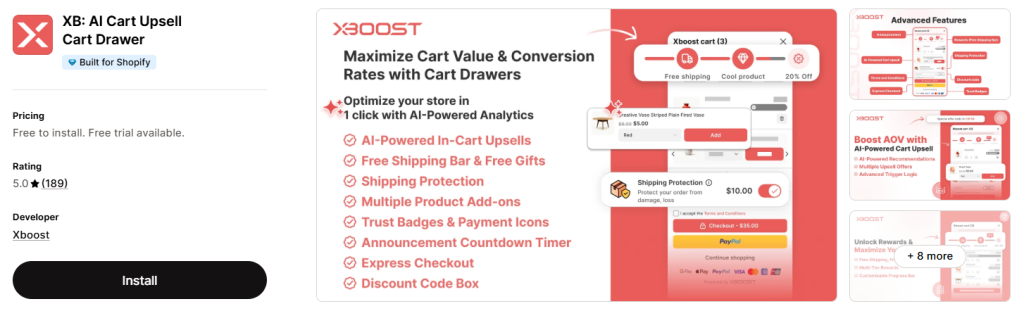
Shopify Rating: 5.0 out of 5
Instead of building a cart from zero, merchants can begin with a one click AI setup in XB: AI Cart Upsell Cart Drawer. The AI studies your niche and order data, then configures the drawer with upsells, add ons, and a free shipping bar. From there, you can change the look using templates, layouts, and colors, and add custom HTML or CSS for finer changes. The cart text can also change based on the shopper’s country, which helps if your Shopify store sells internationally. Before checkout, you can ask shoppers to agree to your terms and conditions.
Key Features:
- AI Powered Cart Upsell: Uses AI to find relevant products and recommend them in the cart drawer.
- Multiple Cart Add Ons: Allows more than one extra product to be offered in the cart, along with shipping protection.
- Rewards in Cart: Combines a progress bar, free shipping, a free gift, and discount codes to give shoppers a reason to spend more.
- Announcement Countdown Timer: Pairs a cart timer with an announcement bar to add urgency to your offers.
- Express Checkout: Gives shoppers faster payment options and shows trust badges and icons in the cart.
Pricing:
| Plan | Pricing |
|---|---|
| 0–50 orders/month | Free to install |
| 51–100 orders/month | $12.99/month |
| 101–500 orders/month | $29.99/month |
10. Snap Cart Drawer Cart Upsell
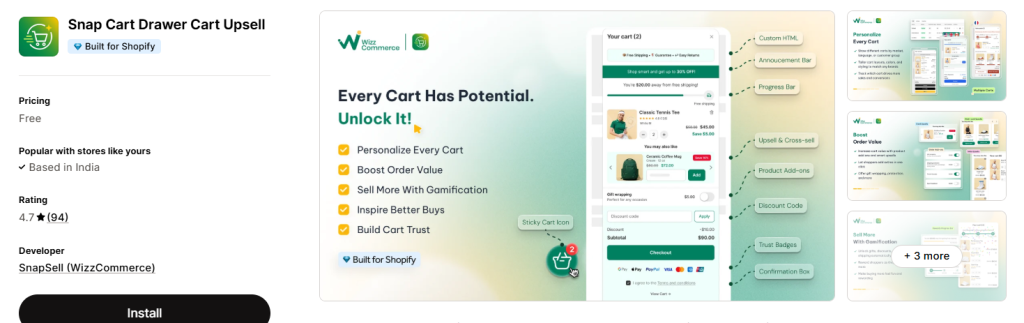
Not every shopper needs to see the same cart. With Snap Cart Drawer Cart Upsell, you can create separate carts for different markets and customer groups, so each audience gets a setup that fits them. Its all in one builder brings your cart offers, timers, and trust elements together in one place. You can choose from several cart designs to match your theme, which helps the drawer feel like part of your Shopify store. It also lets you offer extras like gift wrapping and shipping protection. For merchants who need shoppers to accept their terms, a required agreement can be added to the cart as well.
Key Features:
- Cart Upsells and Add Ons: Suggests extra products in the drawer so shoppers can add more to their order before checkout.
- Tiered Rewards: Uses progress bars to show how close shoppers are to free shipping, a free gift, or a discount.
- Countdown Timers: Puts a time limit on your cart offers, which gives shoppers a reason to decide sooner.
- Trust Elements: Displays badges and shipping details that help buyers feel confident about their purchase.
- Quick Cart Access: Lets shoppers reach their cart through a floating icon, sticky button, or mini cart.
Pricing: Free
Final Thoughts
The right choice depends on what your Shopify store needs most right now. If you want a higher order value, look for a Shopify cart upsell app with useful product suggestions and a clear reward bar. If design matters more, choose a Shopify slide cart app that gives you control over the layout. If you sell in several countries, check its language and market support first.
Your budget and order volume matter too. Some plans are based on monthly orders, while others use a set monthly price, so check how the cost may change as your Shopify store grows. It also helps to start with one or two offers, such as a free shipping bar and a product suggestion. Too many offers can make a small cart panel feel crowded.
Before you decide, test your Shopify cart drawer app on both desktop and mobile, then review your order data after a few weeks. Look at average order value, how often shoppers add suggested products, and whether they still move smoothly to checkout. Even among the best Shopify cart upsell apps, the right one is the one that fits your products and how your customers shop.
Frequently Asked Questions
1. What is a Shopify cart drawer upsell app?
A Shopify cart drawer upsell app adds a side cart to your Shopify store and shows offers inside it. These offers can include related products, add-ons, and rewards. Shoppers can review them while checking their cart, without moving to a separate cart page.
2. What are the best Shopify cart drawer apps?
The best Shopify cart drawer apps include:
- Section Store & Cart Drawer
- Kaching CartDrawer Cart Upsell
- Essent Cart Drawer Cart Upsell
- Amp Slide Cart Drawer Upsell
- UpCartAOV: Cart Drawer Upsell
- Moon Bundles CartDrawer Upsell
- Qikify Slide Cart Drawer
- EA Sticky Cart Drawer & Upsell
- XB: AI Cart Upsell Cart Drawer
- Snap Cart Drawer Cart Upsell
3. What is the difference between an upsell and a cross sell?
An upsell encourages a shopper to choose a higher value option, such as a larger size or better version. A Shopify cross sell app suggests a related product, such as a phone case for a phone. Many cart apps support both types of offers.
4. How do I add a cart drawer to my Shopify store?
Choose a cart drawer app from the Shopify App Store, install it, and turn it on from your theme or app settings. Next, match the drawer to your brand and add offers like product suggestions or a free shipping bar. Before going live, test the cart on desktop and mobile. Check that discounts apply correctly, totals update, and shoppers can reach checkout smoothly.
5. How many upsell products should a cart drawer show?
Most Shopify stores can start with one to three relevant products, as a short list keeps the drawer clean, especially on mobile. Choose items that match what is already in the cart, such as a case for a phone. Lower priced products are often easier for shoppers to add. You can also use order data or A/B tests to find the suggestions that work best.

Co-Founder & CMO at eWebWorld
Rahul Chandrawanshi is the Co-Founder and Chief Marketing Officer at eWebWorld, where he contributes to business strategy, digital growth, and client success. He brings a business-focused perspective to case studies, highlighting the challenges businesses face, the solutions implemented, and the outcomes achieved through digital experiences and technology.
Search
Popular Posts

Follow us

Recent Posts
About eWebWorld
eWebWorld is a Shopify and eCommerce development company in India with 10+ years of experience building and scaling online stores. We specialize in Shopify development, including store setup, customizations, theme development, migrations, integrations, and performance optimization. Through our expertise in eCommerce, technology, and digital marketing, we help businesses create better online experiences and achieve sustainable growth.